
Modern Seat cars come equipped with advanced infotainment system
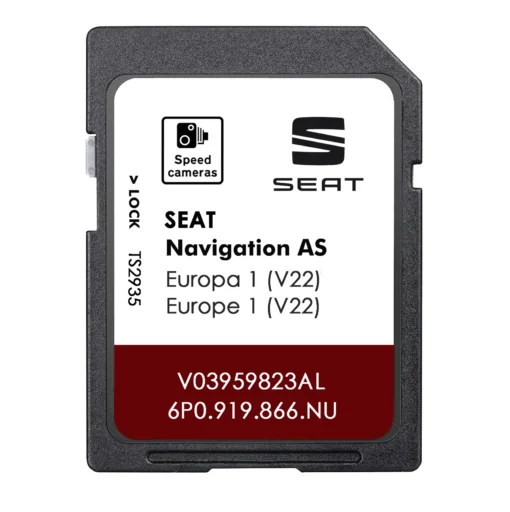
s, and at the heart of the navigation function is often a tiny Seat SD card – effectively a smart card that stores all the map data. These smart cards play a crucial role in how Seat’s onboard navigation works. They not only hold detailed road maps and points of interest, but also enable easy updates to keep the system current. In this article, we’ll delve into what these smart navigation cards are, why they’re used in Seat vehicles, and how they benefit drivers in the age of digital maps.
What Is a “Smart Card” in Seat Navigation?
In the context of Seat vehicles, a “smart card” refers to the SD memory card that contains your car’s navigation maps and software. This isn’t just any generic SD card – it’s a specialized card programmed for your car’s sat-nav system. Seat navigation SD cards contain detailed mapping data (roads, highways, addresses, etc.) tailored for the specific navigation unit in your model. They also include important information like points of interest (POIs) – gas stations, restaurants, landmarks, and can even support live traffic updates on compatible systems.
Because the navigation card is effectively the database for the GPS, the car relies on it for all routing information. If the card is missing or corrupted, the navigation system typically won’t function at all. This design – using a removable smart SD card – has a few advantages. Firstly, it allows the map data to be easily updated or replaced without needing to change the whole head unit. Secondly, it provides a secure medium – each navigation SD card is usually coded to work only with certain models or regions. You can’t simply use a map card from another vehicle in your Seat, since the data on it may not be compatible and the system could reject it. In other words, the smart card is uniquely tied to your car’s navigation system, ensuring you have the right maps and features for your exact model.
Why Do Seat Navigation Systems Use SD Cards?
Seat (along with other brands in the Volkswagen group) began using SD cards for navigation storage in many of their models in the 2010s. Prior to that, some cars used DVDs or even hard drives for maps. The switch to SD cards offered a more compact, solid-state solution. An SD card can hold a large amount of map data – often covering entire continents – yet it’s small and easily replaceable. This suits modern car design where space is at a premium and electronics have to be robust against vibrations.
Using a smart SD card for maps also makes updating the navigation more convenient. Instead of needing a dealer to install new software or drivers having to burn DVDs, updates can be done by loading new data onto the SD card. In fact, Seat often provides annual map updates that owners can install either by downloading to the card or by purchasing an updated SD card from an authorized source. The SD card approach means that even an older Seat model can get fresh maps years later – you just swap out or reprogram the card, rather than replacing the entire navigation unit.
Benefits of SD Card-Based Navigation
Relying on a smart SD card for navigation brings several benefits to Seat drivers:
- Offline Reliability: Perhaps the biggest advantage is that all maps are stored locally on the card. Unlike smartphone navigation apps which depend on cellular data, the car’s built-in navigation doesn’t require an internet connection for map data. If you’re driving through a rural area or a place with poor cell coverage, your Seat’s navigation will still work flawlessly because the maps are on the SD card. By contrast, lose your phone’s data signal and you might find yourself without guidance. The SD card essentially turns your car’s nav system into an offline GPS device that’s always available no matter where you are or whether your phone has battery and signal.
- Integration with Vehicle Systems: The navigation that runs from the SD card is integrated into the vehicle’s infotainment and dashboard. Directions from the nav can be shown on your Seat’s main display and sometimes on the instrument cluster screen between your gauges. Voice guidance comes through the car’s speakers. The system can also mute or lower the music volume when giving directions. This level of integration makes the navigation experience seamless and less distracting. In contrast, using a phone for navigation often means glancing down at a smaller screen or dealing with dashboard mounts and cables. The built-in Seat system, powered by its smart card, works smoothly with steering wheel controls and the car’s audio, providing a factory-fit user experience.
- Comprehensive & Fast: Because the maps are stored on a high-speed SD card, the system has access to a huge amount of detailed data (covering many countries, millions of POIs, etc.) and can retrieve it quickly. The navigation can display complex details like junction diagrams or 3D landmarks without delay, and it recalculates routes swiftly since it doesn’t depend on any external data connection.
- Easy Map Updates: As mentioned, one of the key roles of the smart SD card is to make map updates easier. If your maps become outdated, you have the option to update them by getting a new SD card or updating the existing one. Many drivers update by buying a new card that already has the latest maps loaded – a simple swap that instantly refreshes the navigation database. Even those who go the do-it-yourself route (using software to update the original card) benefit from the SD card design – they can remove the card, load new data via a computer, and put it back, all without having to touch the in-dash hardware. In short, the SD card acts as the delivery vehicle for new maps. It’s much simpler than replacing an entire navigation unit, and it puts some control in the owner’s hands to decide when and how to update.
Built-in navigation systems using SD cards offer dependable guidance even in areas with no mobile signal. Unlike smartphone apps that can lose function without data coverage, an offline car nav keeps working – ensuring you won’t get lost due to a dropped connection.
Keeping the Maps Up-to-Date
Even the best navigation system needs up-to-date maps to remain reliable. Over time, new roads and changes can render old maps inaccurate, leading to wrong directions or missing information. For this reason, Seat releases map updates (usually yearly), and it’s wise to refresh your navigation data every year or two. Updating is straightforward: you can have your existing card updated by Seat (for example at a dealership), or simply get a new SD card preloaded with the newest maps. Many owners find the preloaded card method easiest – just swap the old card out and put the new one in, and the car will immediately have the updated database. Whichever method you choose, ensure the map update is specific to your Seat model and region to guarantee compatibility and a smooth upgrade.
The Future of Navigation Systems
As technology progresses, the role of physical smart cards in navigation might evolve. Newer Seat models and other Volkswagen-group cars are starting to feature “connected” navigation that can update over-the-air or use internal storage instead of external SD cards. However, as of now, SD-card based systems remain very common and practical. They provide a tangible way for owners to control and update their navigation experience.
Even with smartphone navigation widely available, the built-in Seat system backed by its smart SD card offers a level of integration and offline reliability that phone apps can’t fully replicate. Drivers who venture off the grid or simply prefer using the car’s native system will appreciate that the guidance won’t drop out in a cellular dead zone and that the interface is made for driving.
In summary, the smart SD card in modern Seat navigation systems is a small but mighty component. It carries the entire navigation knowledge for your car, from the streets you drive on to the destinations you search for. It enables your Seat to be a true guide on the road – one that is always at the ready, rain or shine, online or offline. By keeping that card updated and cared for, you ensure that your trusty co-pilot (the sat-nav) is equipped with the best and latest information to help you on all your journeys.
Leave a Reply